 Link Status Checker
Support
Link Status Checker
Support
Chrome extension · Version 1.0.1
Link Status Checker
Check links on the current webpage and see their HTTP status directly on the page.
- HTTP 200
- HTTP 404
- Other status or connection failure
See link status in context
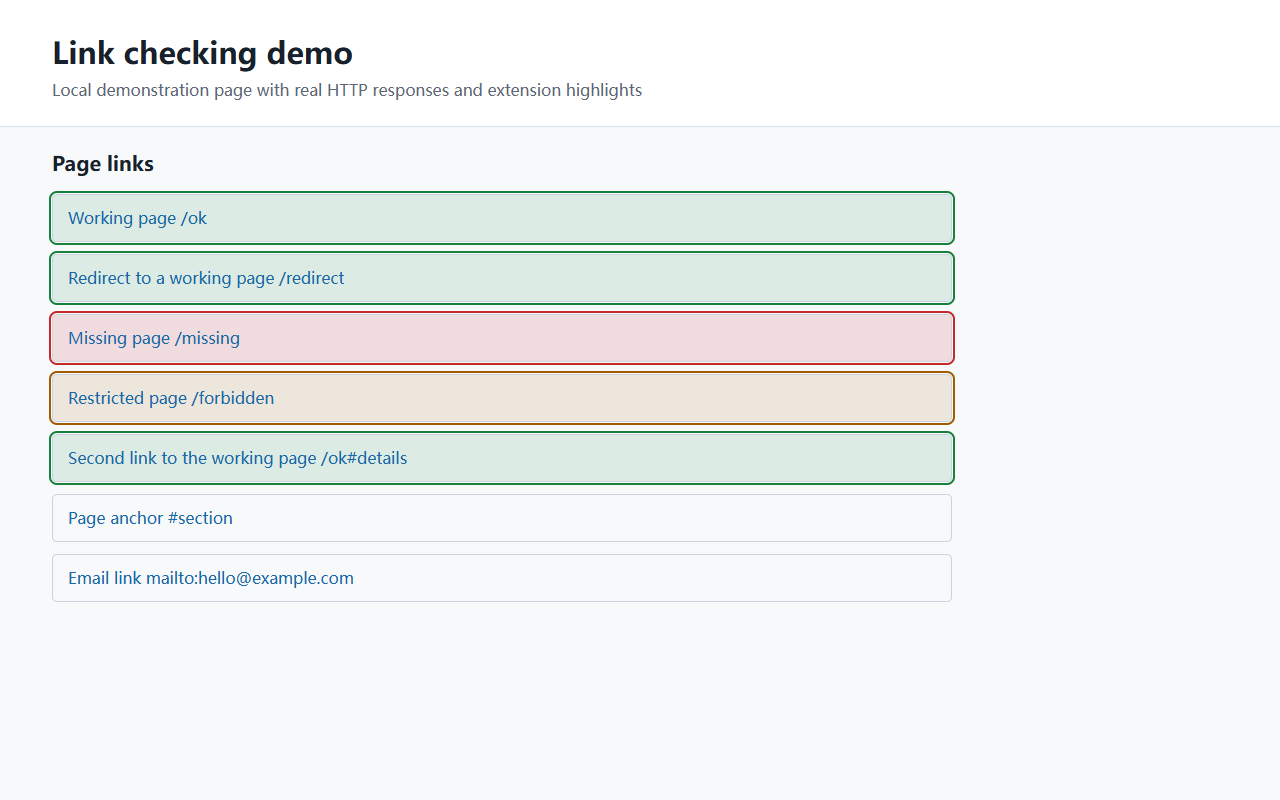
What it checks
- Up to 500 unique HTTP or HTTPS URLs in the current page's main document per scan.
- Every occurrence of a duplicate link, with each unique URL checked only once.
- Redirects followed to their final response, with the destination available in the link tooltip.
- Live progress and status counts in the extension popup, even after closing and reopening it.
Start a scan
- Open an ordinary HTTP or HTTPS webpage.
- Click the Link Status Checker extension icon.
- Select Check current page and wait for the highlights.
- Hover over a marked link to see its response status. Use the circular-arrow button to stop and clear markers.
HEAD requests are used first. HEAD responses of 404, 405 or 501 are checked again with GET. Six requests run at a time, each with a 15-second timeout.
Understanding the results
Green means a final HTTP 200 response; it does not verify the page's content. Red means a confirmed HTTP 404 response. Other responses, timeouts and network failures appear amber.
Requests omit cookies and login credentials. Login requirements or anti-bot protection can produce different results from opening a link manually. Soft 404 pages returning HTTP 200 are not detected.
Page anchors, email and phone links are skipped. The extension does not crawl the website or inspect other tabs, iframes or Shadow DOM. Scan again to check dynamically added links. Chrome internal pages and Chrome Web Store pages cannot be scanned.
Your data
The extension has no analytics, accounts or developer-operated collection server. It sends status requests directly to link destinations, which receive the request URL and normal connection information. Scan results stay in the current tab's memory.
Read the extension privacy policy